
A toggle’s on-color is usually whatever was closest to hand, not a decision anyone made twice.
Open three different settings panels in the same product and count the toggles. Dark mode is teal. Notifications is a muted blue-grey. Auto-save is whatever the component library shipped with. Nobody chose three different colors on purpose, each one just got built in isolation, by whoever touched that screen that week. A switch is one of the smallest components in any interface and also one of the most repeated, which means a small inconsistency in it shows up constantly instead of rarely.

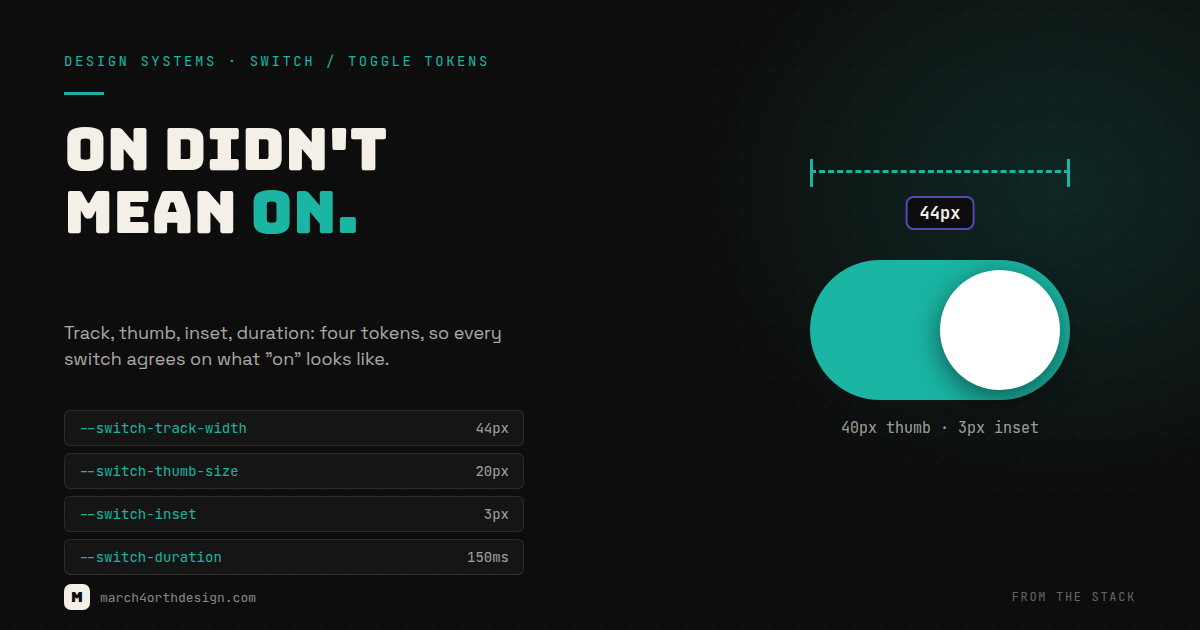
The fix is the same move design tokens always make: stop treating the switch as a one-off style and name its parts. Four values cover it. `--switch-track-width` and a matching height set the pill's proportions so every toggle reads at the same scale. `--switch-thumb-size` and `--switch-inset` fix how much padding sits between the thumb and the track edge, which is the detail that makes a toggle look either crisp or sloppy depending on whether it's consistent. `--switch-duration` names how fast the thumb slides, because a flip that takes 80ms somewhere and 400ms somewhere else reads as a bug even when both are technically fine.

None of this requires a new design decision for every toggle you build after today. You pick the four values once, put them in the token file, and every switch component references them instead of hand-tuning its own version. The payoff isn't visual polish for its own sake, it's that a user's eye stops re-learning what "on" looks like every time they hit a new screen.


Watch the reel on Instagram. Link going live 2026-11-25 (Wed).
Start with the track and thumb sizing, since that's the one most component libraries already expose as a variant prop. Lock the color and duration next. If your product has more than one toggle style (a settings-page switch versus a compact table-row switch, say), that's still two tokens sets, not zero, each one named and reused everywhere that size appears.
Follow @march4orthdesign on Instagram for the next one.
http://staging.march4orthdesign.com/m4d-projects/download.html
Leave a Reply